



Table of Contents
Support desk tickets stack up while finance waits on software access. A compliance lead chases screenshots for an audit folder. Customers hear dead air during a VoIP issue, and nobody wants to guess whether the network, firewall, or carrier is at fault.
That’s why the question what are managed IT services matters. In a recent study, 60% of respondents said cybersecurity was the top challenge that led them to work with an MSP. For growing teams, the goal is simple: reliable systems, faster response, current documentation, and fewer surprises. As a Dallas-based partner, we believe that starts with knowing your business, not routing people through a call center.
Jason Page, Service Manager at GlacisTech, notes: “Managed IT works best when the provider can name the system, the owner, the risk, and the next step before a small issue slows the business.”
What Are Managed IT Services For Daily Business Operations
Managed IT services are easiest to understand through daily work.
-
Recurring support coverage: Users get help with logins, printers, access requests, and software errors without every ticket becoming a scramble.
-
Monitoring and maintenance: Network alerts, patches, endpoint checks, and backup status get reviewed before they interrupt calls or approvals.
-
Documentation and reporting: Asset records, monthly performance reports, and known configurations give leaders clearer ownership.
-
Security and coordination: A dedicated team tracks endpoint alerts, firewall issues, licensing renewals, and provider handoffs.
Managed IT Services Definition In Plain Business Terms
The managed IT services definition is ongoing responsibility for keeping IT systems monitored, supported, secured, documented, and aligned with business needs.
That matters because leaders need to know who owns the issue, what gets checked, when they’ll hear back, and how records stay current.
-
Known systems: Device, application, and access records stay current.
-
Clear checks: Backups, alerts, patches, and security tools have assigned review steps.
-
Business alignment: Planning connects IT decisions to hiring, audits, and customer deadlines.
Omdia experts report that 40% of organizations are turning to fully managed security services to safeguard operational technology.
A North Texas team may face endpoint alerts, licensing renewals, backup checks, and a user access request before a client deadline. With documented assets and a known support path, the work gets routed in order. Deadline intact.
Managed IT Definition And What IT Includes
You need to know what’s included before comparing providers. A useful managed IT definition makes scope clear enough to match invoices, tickets, assets, and risk reviews.
-
Network operations: Network design, administration, and 24/7 monitoring tied to uptime and user access.
-
Traffic and diagnostics: Routing checks and performance troubleshooting when cloud apps slow down.
-
Infrastructure support: LAN, WAN, wireless, ethernet, hardware, and application managed services support.
-
Secure access controls: Firewall, router, VPN, remote access, and endpoint protection coverage.
-
Recovery readiness: Backup checks, data recovery planning, disaster recovery steps, and current documentation.
Scope matters when a ticket, outage, renewal, or backup failure needs a clear owner.
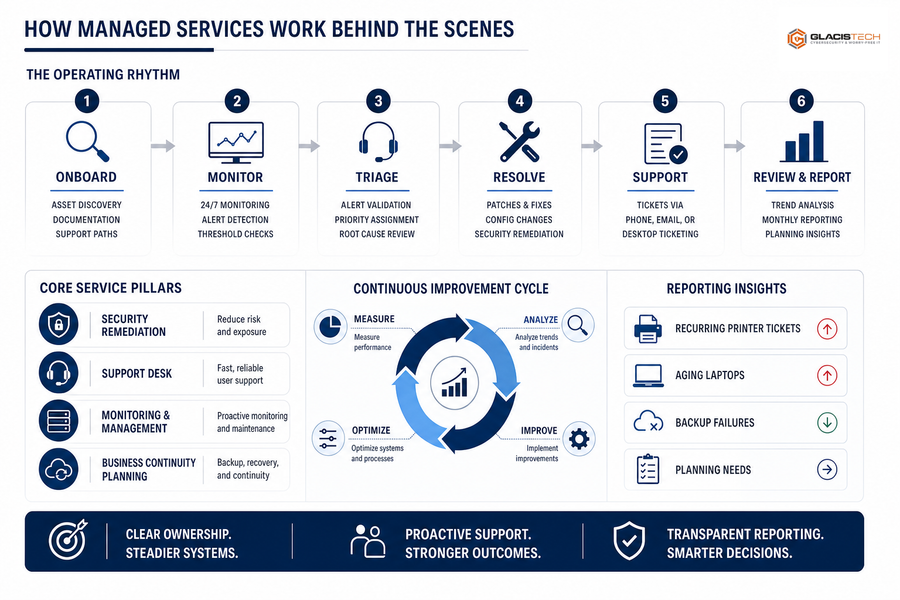
How Managed Services Work Behind The Scenes
Here’s how the definition turns into an operating rhythm.
The four capability areas are monitoring, support desk response, security remediation, and business continuity planning.
This is how managed services work in practice: onboarding starts with asset discovery, documentation, monitoring setup, and clear support paths. From there, the team triages alerts, applies patches, handles tickets by phone, email, or desktop ticketing, and reviews trends through monthly reporting. IT services are a major operating category, with 2024 worldwide spending reaching $1.59 trillion. That scale reflects demand for steadier systems and clearer ownership. Transparent reporting helps leaders see recurring printer tickets, aging laptops, backup failures, and planning needs before budget season.
Managed IT Services Meaning For Risk And Compliance
The managed IT services meaning shows up when security, compliance, and support records need to match real activity.
-
Faster routing for tickets Access problems, failed logins, and device issues go to the right technician with system history attached.
-
Cleaner evidence for compliance Documentation supports audit readiness and CMMC compliance remediation work without promising a blanket pass.
-
Stronger response for endpoints AI-powered EDR alerts get reviewed, prioritized, and documented as part of normal security operations.
-
More reliable checks for backups Failed backup jobs are visible before a restore request becomes the first test.
-
Better tracking for renewals Licensing and compliance dates stay connected to budgets, users, and approved software lists.
Trend Micro found that 33% of respondents rely on MDR or MSSP offerings. Provider security also deserves scrutiny: 90% of MSPs have reported at least one cybersecurity incident in the past year, which makes clear processes and documentation even more important.
Get IT Support That Scales
If support tickets, access issues, or security gaps are slowing your team, GlacisTech can help you plan a clearer managed IT path.
What Is IT Managed Services Provider Support During Growth
Changing IT support models takes coordination during hiring, expansion, audits, or customer-facing deadlines. Growth changes the workload.
A better way to answer what is IT managed services provider support is to look at whether the provider connects daily tasks to planning, budgeting, security decisions, and leadership priorities, including virtual CIO guidance when technology choices affect growth.
-
Audit current tickets: Find repeat issues by user, site, device, or application.
-
Review asset documentation: Confirm devices, warranties, owners, and locations.
-
Verify backup reporting: Check job status, restore paths, and review cadence.
-
Assess renewals and patterns: Tie licensing dates to recurring support demand.
What Managed Services Should Help You Do Next
Understanding what managed services should help you do next comes down to clearer ownership, proactive maintenance, stronger documentation, better security visibility, and support that keeps pace as the business grows. You see it in ordinary work: a clean access approval, a resolved endpoint alert, a backup report someone reviews, and a leadership conversation before renewal costs surprise the budget.
If you’re in Dallas, DFW, or North Texas and want a practical read on where your IT risk stands, contact us at GlacisTech about our free IT risk assessment. No pressure, just a clearer starting point with a dedicated team that gets to know your business before the next VoIP issue, access request, or audit deadline turns into a fire drill.