



Table of Contents
An office manager is waiting on invoice approvals while the accounting app spins. Two vendors are calling, a department head needs a purchase order, and nobody knows whether this is a quick login reset or a sign of a larger issue.
That’s why the choice around break fix vs managed services is more than an IT pricing decision. It affects downtime, repeat tickets, response time, and whether people spend the day doing their actual work. Spending on managed services rose to 18% of IT budgets in 2023, up from 15% before the pandemic, because leaders want fewer surprises. As a Dallas-based team serving DFW and North Texas, we see that need show up in practical ways.
Jason Page, Service Manager at GlacisTech, notes: “The practical question is simple, do you want help only after work stops, or do you want someone watching patterns before staff lose time?”
Break Fix Vs Managed Services In Daily Operations
This decision shows up first in everyday work, not in network diagrams, because staff feel the difference in approvals, access, and handoffs.
-
Staff interruptions shrink: With reactive help, the same login issue can pull a supervisor away each morning. Proactive 24/7 monitoring catches warning signs earlier, so a known access problem doesn’t become the team’s daily opener.
-
Small issues get tracked: A shared drive that disconnects twice a week looks minor until estimates, contracts, or donor lists sit in the wrong folder. Monthly reporting turns those patterns into something leaders can review.
-
Application access stays visible: When a user can’t reach accounting software before payroll, a dedicated team that knows the setup can respond without starting from scratch.
-
Approvals keep moving: If purchase approvals depend on email, identity access, and a cloud app, one weak link slows everyone behind it. Documentation helps us see the whole chain, not just the newest ticket.
When Break Fix Services Still Make Sense
Break fix services can fit very small teams with simple devices, few shared applications, and low downtime risk. If one person uses a laptop, stores files locally, and can wait a day for repair, reactive help may be enough. The strain starts when approvals, shared files, customer replies, or compliance tasks depend on systems staying available.
-
Practical fit is narrow: A two-person office with basic email and one printer may not need constant monitoring, especially when deadlines are flexible.
-
Hidden limits appear slowly: The model gets harder when staff repeat the same vendor story, chase missing permissions, or delay a client packet because a cloud folder won’t sync.
-
Decision signals are clear: If leadership needs visibility into aging devices, security gaps, recurring tickets, or compliance remediation, planned support becomes easier to justify.
The next step is looking at what the business actually needs to keep moving. Access, documentation, monitoring, and security planning all shape that decision.
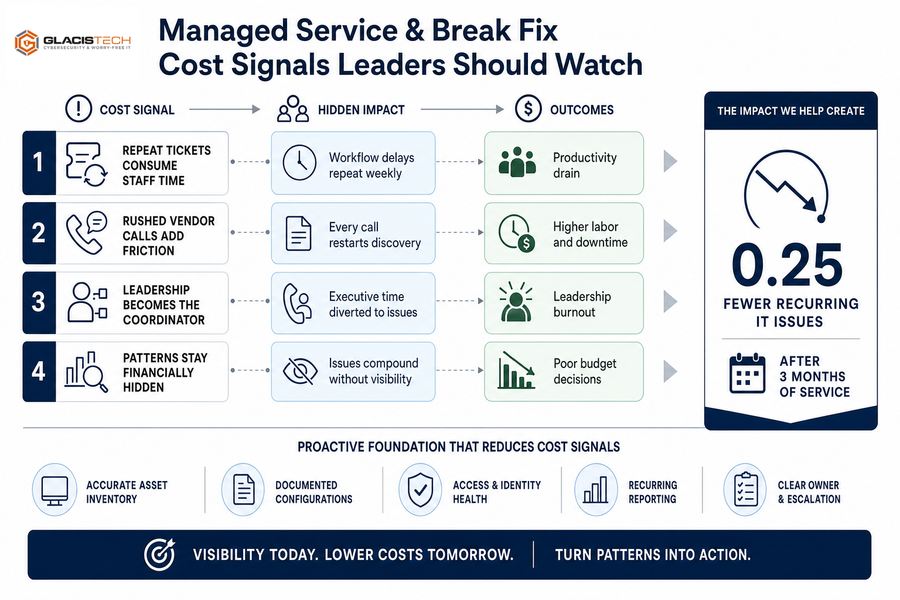
Managed Service And Break Fix Cost Signals Leaders Should Watch
The same printer fails every Monday before shipping labels run, and three people stop to troubleshoot it again.
The visible cost is the service call. The quieter cost is the warehouse lead reprinting labels, the customer service rep delaying tracking updates, and the manager texting a vendor for status. Monthly performance reporting helps separate one-off annoyances from patterns that drain attention.
GlacisTech clients experience an average reduction of 0.25 in recurring IT issues after 3 months of service.
-
Repeat tickets consume staff time
A login reset that keeps returning is not just a password issue. It’s a workflow delay. -
Rushed vendor calls add friction
When documentation is thin, every software vendor call starts with discovery. Asset records and known configurations shorten that path. -
Leadership becomes the coordinator
Owners and directors shouldn’t have to translate between users, vendors, and support when a recurring IT issue needs a clear owner. -
Patterns stay financially hidden
A single repair invoice looks manageable. A monthly report showing aging devices, access failures, and unresolved dependencies gives leaders a better basis for budget decisions.
Explore IT Support Options
Choose IT Support That Fits Your Workday
Still weighing break fix vs managed services? GlacisTech can help you assess support needs around uptime, workflows, and daily operations.
Managed Services Or Break Fix For Applications And Workflows
A donor report is due before a board meeting, but the donor management tool won’t export the right fields. The laptop works. The work is still blocked.
-
Access issues need context.
Application support has to know who approves access, which roles can see financial data, and which deadline matters first. -
Vendor coordination saves time.
When accounting software or a legal document system fails, staff shouldn’t repeat the same history to three support desks. A familiar team can carry the thread. -
Workflow changes need guidance.
A new approval step in an estimating platform can slow sales if users don’t know where requests now land. Training keeps the handoff clear. -
Documentation prevents repeat confusion.
Notes on portals, permissions, file paths, and vendor contacts reduce guessing when the next issue appears. -
Recurring problems deserve review.
Our application managed services and support connect user tickets to workflow patterns, so teams get back to normal work faster.
Break Fix And Managed Services Planning For Growth
Changing support models is hard because staff are already busy. Nobody wants another meeting when onboarding is behind, cloud storage is messy, and a compliance checklist is unfinished. Still, planning matters because security and downtime costs show up in business decisions. IBM reported 63% of organizations said they would increase the cost of goods or services because of a breach, up from 57% last year.
-
Document assets and owners: List devices, users, warranties, cloud services, and the person who approves changes.
-
Review recurring ticket patterns: Monthly reporting helps spot repeat access issues, aging endpoints, and vendor dependencies.
-
Identify critical applications: Mark payroll, accounting, customer portals, donor systems, and document platforms that can’t wait.
-
Assign approval owners: Decide who can approve new users, software changes, device purchases, and security exceptions before work gets stuck.
-
Schedule an IT risk review: Virtual CIO guidance and a free IT risk assessment can turn cybersecurity, compliance remediation, cloud services, and budgeting into a practical roadmap.
That planning gives the final choice a clearer shape.
|
Planning Area |
Operational Signal To Review |
Owner Or Handoff |
Useful Output For Leadership |
|---|---|---|---|
|
Endpoint lifecycle |
Windows 10 laptops older than four years, missing BitLocker status, or lacking endpoint detection alerts in Microsoft Intune |
IT administrator gathers inventory; department managers confirm replacement needs |
Quarterly refresh forecast with device counts, estimated spend, and priority users |
|
Recurring support demand |
Help desk tickets showing repeated VPN lockouts, printer failures, Microsoft 365 password resets, or Teams audio issues |
Service desk lead tags root causes; operations manager approves workflow or training changes |
Monthly trend report showing preventable interruptions and recommended fixes |
|
Application dependency |
Accounting, ERP, CRM, payroll, and industry-specific platforms with no documented recovery owner or vendor escalation path |
Business unit leader validates impact; IT documents vendor contacts, backup method, and recovery priority |
Critical application register tied to recovery expectations and business impact |
|
Cybersecurity and compliance gaps |
MFA exceptions, stale user accounts, failed backup tests, unsupported software, or missing evidence for HIPAA, PCI, or insurance reviews |
Security contact reviews findings; compliance owner approves timing and evidence retention |
Risk remediation roadmap with due dates, responsible parties, and unresolved exposure |
|
Executive IT governance |
Unplanned cloud subscription growth, recurring outage patterns, renewal surprises, or risk items without business decisions |
Virtual CIO prepares agenda; CEO, CFO, or COO approves priorities and budget assumptions |
Leadership review packet covering risk, spend, roadmap progress, and upcoming decisions |
Choosing The Right Support Path For Your Team
The right support path depends on how long work can stop, how heavily the team relies on business applications, how often the same issue returns, what compliance requires, and where growth is headed next. If invoice approvals, donor reports, payroll, or customer files keep getting stuck behind the same technical issues, it’s time to look at prevention instead of another one-time fix.
If you want a practical read on your current IT risk, contact us at GlacisTech for a low-pressure conversation or free IT risk assessment with a Dallas-based team that gets to know your people, systems, and priorities.