



Table of Contents
- Exchange Online Outage Exposed More Than Email
- How A Microsoft Outage Affected Small Businesses Across The Metroplex
- Microsoft 365 Business Continuity Starts With Fallback Decisions
- A Microsoft 365 Backup Plan Should Support Compliance And Recovery Work
- A Microsoft 365 Outage Impact Review Should Start With The Work Email Downtime Interrupts
A Richardson professional services firm starts Thursday afternoon trying to confirm client approvals, but Outlook search is slow, calendar updates lag, and Teams scheduling doesn’t tell the whole story. That’s where the Microsoft 365 outage impact shows up first: in the work people promised to finish before close of business.
Microsoft’s preliminary report for EX1550543/MO1550821 lists the incident from Thursday, November 12, 2026 at 4:20 PM UTC to Friday, November 13, 2026 at 4:10 PM UTC, about 23 hours and 50 minutes. Tenant experience varied by service, region, connection method, and timing.
Shawn Kruze, CTO at GlacisTech, notes: “The lesson isn’t to panic over Microsoft 365. It’s to know which approvals, messages, and records need a backup path before work stalls.”
Exchange Online Outage Exposed More Than Email
The Exchange Online outage mattered because Exchange Online is not just an inbox. It supports calendars, shared mailboxes, meeting invites, mobile sync, mailbox search, distribution workflows, retention, eDiscovery, booking workflows, Copilot grounding, and third-party mail integrations.
Microsoft’s preliminary post-incident report, still subject to final review, described the November 2026 event as primarily affecting Exchange Online access and delayed email. The same report said nearly 14% of Microsoft 365 networking gateway server capacity was already out of service from an unrelated issue when outage conditions converged. Some customers also saw spillover into Teams, Copilot, SharePoint, OneDrive, Defender, Purview, Fabric, Intune, Planner, Power Apps, To Do, Power BI, and Universal Print.
That’s where dependency chains become business problems. When email, scheduling, shared mailboxes, and approval routing slow together, people lose response time and managers lose visibility.
| Business Workflow | Microsoft 365 Dependency to Check | Likely Failure Mode During Service Degradation | Practical Continuity Step |
|---|---|---|---|
| Customer support triage handled by a shared mailbox | Exchange Online shared mailbox, Outlook rules, Defender message scanning, CRM email ingestion | New cases arrive late, auto-forwarding rules lag, CRM timelines miss recent replies | Route urgent tickets through a temporary phone or SMS path and document manual CRM updates after recovery |
| Executive meeting coordination across departments | Exchange calendars, Teams links, room mailbox booking policies, mobile Outlook sync | Room availability appears stale, invite updates miss phones, assistants double-book rooms | Maintain an offline or non-Microsoft schedule for critical meetings and confirm changes by SMS or phone |
| Invoice approval and purchase request routing | Exchange mail flow, Power Automate approvals, distribution lists, Planner task notifications | Approval emails queue, approvers miss deadlines, Finance cannot confirm request status | Use a preapproved out-of-band approval log with Finance Director signoff and reconcile after mail flow normalizes |
| Legal hold, investigation, or HR records request | Purview eDiscovery, mailbox search, retention labels, OneDrive and SharePoint indexes | Search results are incomplete or delayed, and response timelines slip | Freeze deletion actions, record affected custodians, and wait for service confirmation before certifying search completeness |
| Field employee access on managed devices | Exchange ActiveSync, Intune compliance checks, Outlook mobile, conditional access, Defender signals | Technicians cannot load dispatch emails and work orders are acknowledged late | Use a fallback call tree and capture job status in an approved dispatch system or offline tracker outside Microsoft 365 |
How A Microsoft Outage Affected Small Businesses Across The Metroplex
The Microsoft outage affected each office differently. A Richardson professional services firm waited on client approvals. A Fort Worth manufacturer watched for supplier email and shipping updates. A Dallas nonprofit delayed donor follow-up and grant communication. A Plano financial firm documented delayed client responses. An Arlington healthcare office worked through referral, prescription, and patient coordination delays.
That local friction matters because small businesses accounted for 97.1% of Dallas-Fort Worth-Arlington employers and 42.1% of employment in 2022. Fiserv also reported DFW small business activity up 7.7% year over year in September 2026.
The effect wasn’t equal everywhere, but delayed cash flow, missed appointments, slower approvals, stalled client work, and after-hours catch-up showed up in familiar ways. In a review, the question is not only whether Microsoft restored service; it’s whether invoices, referrals, customer replies, grant records, and vendor commitments were caught up cleanly afterward.
Microsoft 365 Business Continuity Starts With Fallback Decisions
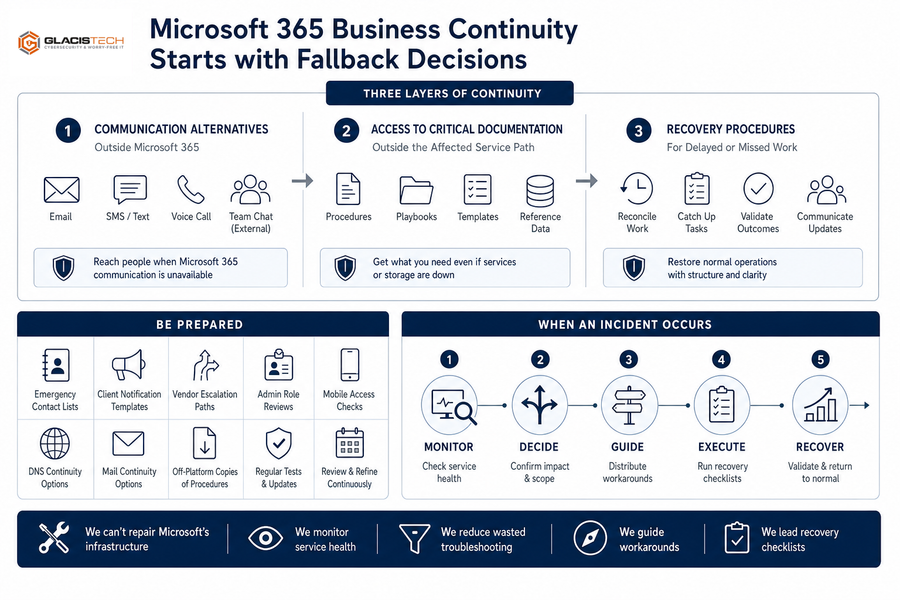
Microsoft 365 business continuity starts with three layers: communication alternatives outside Microsoft 365, access to critical documentation outside the affected service path, and recovery procedures for delayed or missed work after Microsoft restores service. “Use another Microsoft tool” isn’t always a fallback when Teams, calendars, shared files, Copilot, and admin workflows depend on the same chain.
Microsoft reported worldwide uptime of 99.526% for Q1 2026 and 99.994% for Q2 2026, which is why major incidents stand out. Planning still matters. Keep emergency contact lists, client notification templates, vendor escalation paths, admin role reviews, mobile access checks, DNS or mail continuity options, and off-platform copies of critical procedures.
We can’t repair Microsoft’s infrastructure, but we can monitor service health, communicate quickly, reduce wasted troubleshooting, guide workarounds, and lead recovery checklists. Our Richardson-based engineers tie the next step to your actual users, systems, tickets, and monthly reporting instead of a generic outage notice.
Strengthen Your IT Resilience
A Microsoft 365 Backup Plan Should Support Compliance And Recovery Work
When a finance director is waiting on grant reports or invoice approvals, a Microsoft 365 backup plan should assume service restoration is not the same as business recovery. After access returns, teams still need to sort delayed email queues, duplicate messages, missed meetings, failed automations, stale dashboards, postponed invoices, client reassurance, support tickets, and leadership follow-up.
The outage was publicly described as a technical outage, not a cyberattack. For regulated businesses, the practical step is verification and documentation, not guesswork. Log outage timelines, user reports, affected workflows, vendor notices, business impact, and evidence that helps distinguish a provider outage from a security incident. If a separate data breach is determined, Texas requirements may apply, including Texas Attorney General notice thresholds and timing, so legal counsel should guide breach notification decisions.
That review often connects backup and disaster recovery, SIEM reporting, continuous monitoring, Microsoft 365 security hardening, and compliance readiness for frameworks such as HIPAA, NIST, CIS, and CMMC Level 2.
Review Your Microsoft 365 Resilience
Outages expose where approvals, email, and recovery workflows can stall. GlacisTech helps DFW businesses review the gaps before they disrupt work.
A Microsoft 365 Outage Impact Review Should Start With The Work Email Downtime Interrupts
The main lesson from the Exchange Online outage is that email downtime was only part of the story. It delayed approvals, vendor updates, customer commitments, ticket handoffs, and access to shared files. Keep Microsoft where it fits, but don’t treat Microsoft availability as the only continuity plan, even with published uptime of 99.526% for Q1 2026 and 99.994% for Q2 2026.
Over the next 30 days, review your dependency map, admin roles, alternate communications, backup access, vendor contacts, incident templates, security alert review, recovery checklist, and monthly reporting. As a Dallas-based MSP and MSSP with a Richardson office, we help North Texas teams connect those pieces through Microsoft 365 and Azure support, dedicated support teams, 24/7 monitoring, vCIO planning, predictable billing, and a free IT Risk Assessment.
If you’re not sure where your Microsoft 365 dependencies begin and end, contact GlacisTech and we’ll help you map the approvals, messages, and records that need a backup path before the next workday stalls.